
Toast isn’t a bad POS—it’s not just the right POS for every restaurant. Its pricing, hardware requirements, and closed ecosystem push a lot of operators to look elsewhere.
The better question when Toast compares alternatives isn’t “which POS is best,” but which one fits how your restaurant actually operates.
Each of the five options below takes a different approach. Some are restaurant-specific. Some are general retail platforms with restaurant features added on. Some are modules inside a larger business-management suite.
None of them is a universal “best” choice; the right one depends on your service style, budget, and how much you want in one ecosystem versus stitched together from add-ons.
Key takeaways
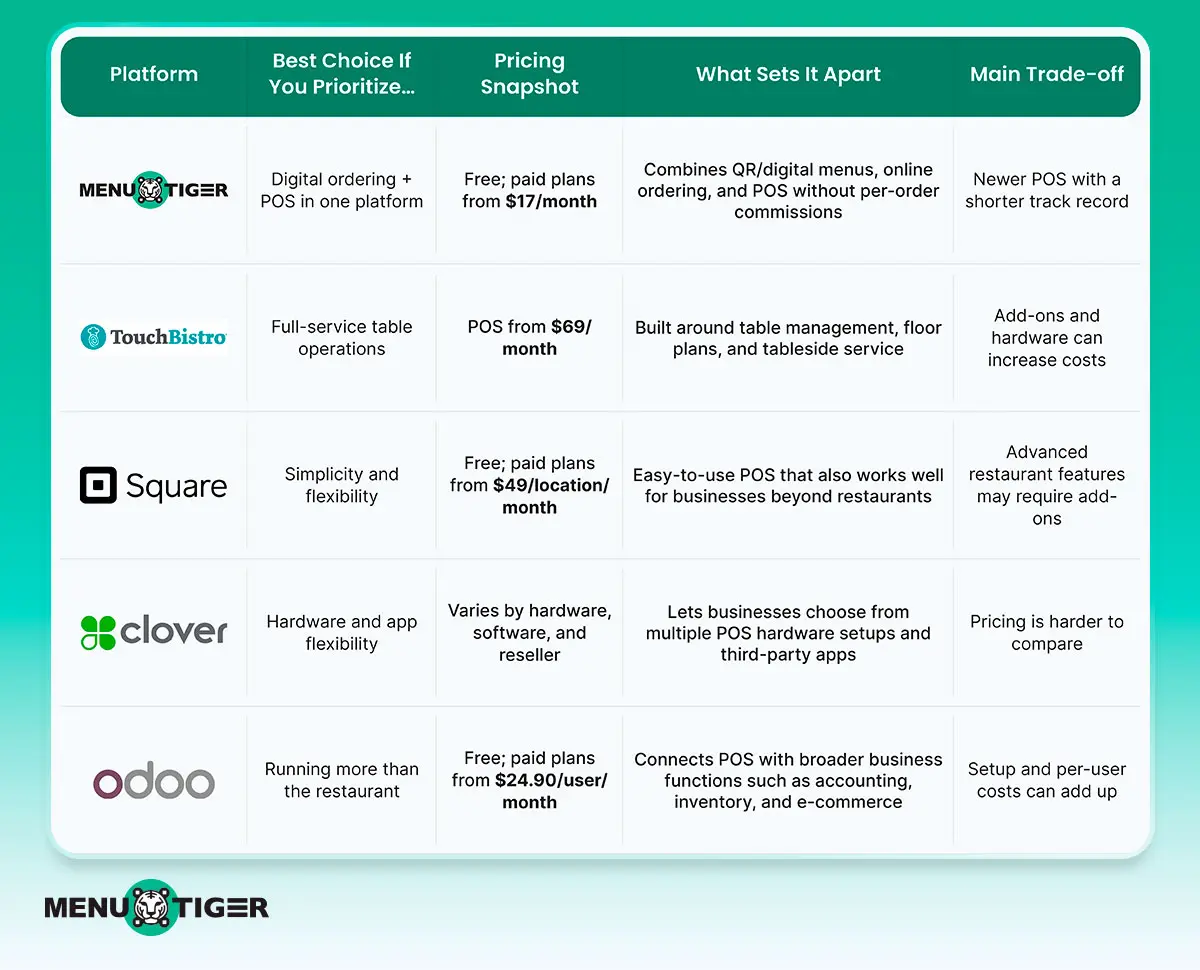
MENU TIGER: A good option if you want digital menus, online ordering, and Point-Of-Sale in one restaurant-focused platform.
TouchBistro: Best for full-service restaurants built around tableside ordering and floor-plan management.
Square: A flexible choice for restaurants that want a straightforward POS that can also support other types of businesses.
Clover: A strong option if hardware flexibility and access to third-party apps are priorities.
Odoo: Worth considering if you want your POS connected to accounting, inventory, e-commerce, and other business tools.
What are the top toast alternatives?
Note on methodology: pricing and ratings below were compiled from vendor sites and public review platforms and are accurate as of publication. POS pricing changes often — it depends on negotiated rates, hardware bundles, and processing volume. Treat every number here as a starting point for a conversation with the vendor, not a final quote — get a written quote before signing anything.
1. MENU TIGER
MENU TIGER pairs digital menus and online ordering with its own POS module—one platform rather than stitched together.
Key features:
- Dine-in/takeaway/delivery orders
- Dedicated order-list screen
- Payments/discounts/refunds
- Inventory tracking with automatic stock deductions
- Customer and staff management
- Sales/tax/payment/product reporting
- Product and table management
- Multi-location support
- Loyalty programs
- Custom receipts and branding.
Pricing
| Plan | Monthly | Annually (15% off) |
| Freemium | $0 | $0 |
| Regular | $17 | $173.40 |
| Advance | $46 | $469.2 |
| Premium | $119 | $1,213.80 |
| Point-of-sale | 6-month free trial | |
MENU TIGER pricing runs from $17 to $119 per month, with a free tier and a six-month free trial on the POS module.
Pros and cons
| Pros | Cons |
| One vendor for digital menu, online ordering, and POS | POS is newer here than at competitors that have run it as their core product for years, so track record and third-party integration depth are less proven |
| Covers core Point of Sale functions plus tables, inventory, staff, and customer management | Some features are plan-dependent |
| Straightforward and easy to configure | May require additional hardware for a complete POS setup |
Check MENU TIGER vs Toast for a full breakdown of the differences.
2. TouchBistro
TouchBistro is built around table-service restaurant operations, with strength in floor-plan and tableside management.
Key features:
- Tableside ordering
- Table/floor-plan management
- Bill splitting
- Kitchen display integration
- Menu management
- Staff and sales reporting
Add-on modules for inventory, online ordering, reservations, and loyalty.
Pricing
| Plan | Monthly |
| Point-of-sale | ~$69 (starting) |
| Essential bundle | $119 |
| Custom set-up | Custom |
Core POS licensing starts around $69/month per terminal. Bundles and add-on modules push the effective monthly cost higher.
Hardware and payment processing are billed separately. Exact figures depend on terminal count and which modules you add — get a quote for your specific setup.
Pros and cons
| Pros | Cons |
| Purpose-built for full-service dining | Add-ons increase total cost quickly |
| Strong floor-plan and tableside tools, | A full-featured setup (POS + inventory + online ordering + reservations) can end up pricier than the base price suggests |
| Modular add-ons let you build out functionality as needed | Hardware and processing costs are separate line items to budget for. |
3. Square POS
Square is a general-purpose POS and added restaurant-specific features over time.
It’s also used heavily in retail and other service businesses, so its restaurant tooling is solid but not as deep as a restaurant-only platform.
Key features:
- In-person and online payments
- Menu/product management
- Inventory tracking
- Table and course management
- Sales reporting
- Marketing tools
- Multi-location support
- Square hardware
- Third-party integrations.
Pricing
| Plan | Monthly Price |
| Square Free | $0/location |
| Square Plus | $49/location |
| Square Premium | $149/location |
| Square Pro | Custom |
Square’s free tier has no monthly software fee, but processing fees apply to every transaction (typically 2.6–2.9% + $0.10–0.15). Paid tiers run roughly $49–$149+/month/location, with custom pricing for larger operators.
Pros and cons
| Pros | Cons |
| Low barrier to entry | Processing fees on the free tier add up at volume |
| Works across business types | Deeper restaurant-specific features (advanced kitchen routing, robust floor plans) often require paid add-ons |
| Simple setup with minimal training | Can feel less purpose-built than a restaurant-only system |
4. Clover
Clover bundles POS, hardware, and a third-party app marketplace. Restaurants choose hardware (countertop, handheld, kiosk) and layer on functionality through apps.
Key features:
- Card/contactless/mobile wallet payments
- Dine-in/pickup/delivery order types
- Tables and split bills
- Inventory tracking
- Customer and loyalty management
- Employee management
- Gift cards
- Third-party app marketplace.
Pricing
Highly variable — Clover doesn’t publish a single standard package. Cost depends on which hardware you buy or lease, which software plan you choose, and your payment processor (Clover is often sold and priced through third-party resellers, which adds further variation).
According to CheckThat.ai, the Clover software plans range from $0 to $89.95/month, while hardware starts at around $549.
Get quotes from more than one reseller before committing.
Pros and cons
| Pros | Cons |
| Wide hardware selection for different restaurant formats | Costs rise as you add apps |
| Large third-party app ecosystem for extending functionality | Competitors because there’s no standard package |
| Supports payments, orders, employees, inventory, and customer tools | No standard package makes budgeting harder up front |
5. Odoo
Odoo is a broader business-management platform — accounting, inventory, e-commerce, purchasing, CRM — with a POS module that plugs into the rest of the suite.
Key features:
- Order and payment processing
- Table/floor management
- Product and combo management
- Self-ordering kiosks
- Kitchen display screens
- Employee management
- Loyalty programs
- Multiple payment methods
- Integration with other Odoo apps.
Pricing
| Plan | Annual billing | Monthly billing |
| One App Free | $0 | $0 |
| Standard | $24.90/user/month | $31.10/user/month |
| Custom | $49/user/month | $61/user/month |
The One App Free plan works if you only need POS, but you lose the cross-app integration that’s Odoo’s main selling point.
Paid plans run roughly $24–$49/user/month on the standard tier. Because pricing is per user, multi-user restaurants should model this cost against headcount, not just location count.
Pros and cons
| Pros | Cons |
| Real advantage if you already use Odoo for accounting/inventory/e-commerce the POS integration is a real advantage | Per-user pricing can get expensive for restaurants with many staff logins |
Free single-app tier exists for very simple needs | The modular system requires more setup and configuration than a POS-only product |
| The free tier’s single-app limit removes the main reason to choose Odoo in the first place. |
Comparing by what actually matters
If budget is the main constraint
Square and Odoo both offer free entry points — Square with no monthly fee (but processing fees apply to every sale), Odoo with a free single-app plan (but limited to one app).
Menu Tiger offers a lower-priced paid tier than TouchBistro’s base POS price. Clover’s cost is impossible to state simply because it depends on hardware and reseller.
The cheapest sticker price isn’t necessarily the cheapest real cost. Model your actual transaction volume and staff count against each pricing structure before deciding.
If you want restaurant-specific depth
TouchBistro and Menu Tiger are built primarily for restaurants rather than adapted from a general retail product.
Square and Clover serve restaurants alongside retail and other service businesses, so some restaurant-specific workflows may feel less native.
If you want one ecosystem vs. best-of-breed
Odoo’s advantage is integration with accounting, inventory, and e-commerce if you’re already in that ecosystem.
Clover’s edge is a large app marketplace if you’d rather assemble functionality yourself.
TouchBistro and Menu Tiger take a middle path with restaurant-specific add-on modules.
On customer ratings
Ease-of-use and satisfaction scores exist for all five platforms on G2, Capterra, and similar sites, but they’re not a reliable way to rank these products against each other.
Review volume varies enormously: established players like Square and Clover have thousands of reviews, while newer entrants like Menu Tiger have far fewer.
A high score built on a handful of reviews isn’t comparable to one built on thousands. Check the review count, not just the headline number.
If setup speed and staff training matter
Square is generally the quickest to set up for a simple, single-terminal operation — its interface is built to be usable with minimal training. Menu Tiger and Clover fall in the middle:
Menu Tiger’s setup depends on how much of the digital-menu and online-ordering side you’re configuring alongside POS, while Clover’s timeline depends on which hardware and apps you choose.
TouchBistro and Odoo typically take longer to fully configure — TouchBistro because table service setups (floor plans, menu modifiers, add-on modules) have more moving parts, and Odoo because getting real value out of it means connecting POS to other Odoo apps, not just standing up the POS module alone.
Run your restaurant your way with the right POS
MENU TIGER brings digital menus, online ordering, and POS together in one restaurant-focused platform. TouchBistro suits full-service restaurants that need floor plans and tableside ordering. Square is a simpler, more flexible option for restaurants and other businesses.
Clover works well if you want flexible hardware and access to third-party apps. Odoo stands out for restaurants that need their POS connected with accounting, inventory, e-commerce, and other business tools.
Before choosing, look beyond the monthly price. Consider the features, add-ons, hardware, payment processing rates, and integrations your restaurant actually needs to run operations efficiently.
Frequently Asked Questions
Disclaimer: MENU TIGER is not affiliated, associated, authorized, endorsed by, or in any way officially connected with Toast, TouchBistro, Clover, Square, Odoo, or any of its subsidiaries or its affiliates.