
iMenuPro alternatives fall into two camps. MENU TIGER, Menubly, and MenuForma let customers browse dishes, place orders, and pay online. Menujo and MustHavesMenu, by contrast, offer view-only digital menu features similar to iMenuPro.
Read on to compare their pricing, features, and capabilities and find the option that best fits your budget, current needs, and plans for future growth.
Quick summary
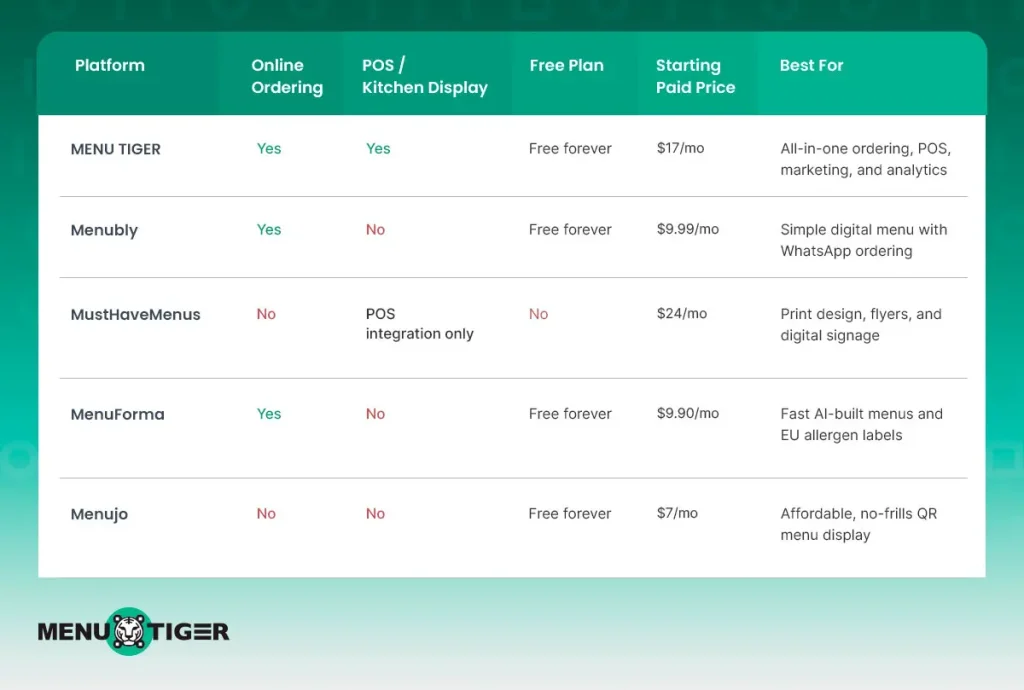

5 digital menu alternatives to iMenuPro
1. MENU TIGER
MENU TIGER is an online ordering system and menu management platform accessible from any internet-connected device with a web browser.
Customers scan a table QR code or tap a shared web link to view a mobile-friendly menu, place orders, and pay — no app download required.
It has a restaurant POS system for full-service dining, letting staff take orders using handheld devices.
Features
- QR code menu
- Online ordering
- Point-of-sale
- Website builder
- AI menu builder (converts a photo or PDF of a paper menu into a digital one)
- Table management
- Waiter call button system (“Hot Actions”)
- Marketing (email, SMS, promotions, loyalty)
- Analytics and insights
- Kitchen display system
- Accounting
- Feedback management
- Multiple location management
- POS and payment integration
Pricing
| Plan | Monthly | Annually (15% off) |
| Freemium | $0 | $0 |
| Regular | $17 | $173.40 |
| Advance | $46 | $469.2 |
| Premium | $119 | $1,213.80 |
| Point-of-sale | 6-month free trial | |
MENU TIGER pricing offers a 14-day free trial on its paid plans. It also advertises no commission per order, no setup fee, and no contracts. Its annual paid plans receive a 15% discount.
Pros:
- One of the most full-featured options on this list, covering ordering, POS, kitchen ordering system, marketing, and analytics in one platform.
- Offers an unusually generous six-month free trial for its Point of sale system.
- Allows restaurants to expand their operations on the same platform without needing to switch to another system later.
- Converts paper menus into digital menus using AI menu maker, including categories, items, descriptions, and images.
Cons:
- The broad feature set can result in a steeper learning curve for restaurants that only need a basic digital menu.
2. Menubly
Menubly is a lightweight digital menu and mini-website platform for restaurants, cafés, food trucks, and bakeries that want a simple way to move their menus online. It combines digital menus with QR codes, online ordering, and website features.
Features
- Online menu
- QR code menu
- Website builder
- 100+ payment methods
- Restaurant website with full branding control
- WhatsApp ordering integration
- Bulk menu import from Excel or CSV files
- Menu conversion
- SEO-optimized menu pages for Google discovery
Pricing
| Plan | Monthly | Annually (20% off) |
| Free | $0 | $0 |
| Pro | $9.99 | $7.99 |
| Custom | Contact providers | Contact providers |
Menubly offers a free plan and a 30-day free trial. Its Pro plan is $9.99 per month or $95.99 per year.
Pros:
- WhatsApp ordering is a nice fit for regions where WhatsApp is the default messaging app
- Very affordable Pro tier compared to most full-ordering competitors
- Menu conversion can help restaurants move existing menu content online more quickly.
Cons:
- Lacks a dedicated POS or kitchen display system
- Feature set is thinner if you need advanced marketing or loyalty tool
- Website builder is described as basic, not a full site-design suite
3. MustHaveMenus
MustHaveMenus is a design-and-print-focused platform rather than an ordering platform. It gives restaurants access to a large library of professionally designed templates for menus, flyers, digital signage, and other marketing materials.
Features
- Digital signage
- Menu designer
- QR codes
- Mobile menus
- Menu management
- Link pages
- Listings management
- POS integration
- Restaurant marketing templates
Pricing
| Plan | Monthly | Annually |
| Design | $24/month | $19/month |
| Pro | $49/month per location | $41/month per location |
| Display | $20/month per screen | $20/month per screen (up to 500 screens) |
| Listings | $60/month per location/concept | $60/month per location/concept |
Pros:
- Best-in-class template library if visual design is your priority
- Digital signage support is a differentiator most ordering-first platforms don’t offer
- Listings management can help restaurants stay consistent across directories like Google and Yelp
Cons:
- Not an ordering platform — you’ll need to pair it with something else if online ordering matters to you
- Pricing is per-location and per-screen, which adds up fast for multi-location brands
- Best suited to restaurants that value branding/print over digital ordering functionality
Worth noting: if your main goal is replacing iMenuPro’s print-design workflow rather than adding online ordering, MustHaveMenus is arguably the most direct like-for-like alternative on this list.
4. MenuForma
MenuForma is an AI-powered QR menu and ordering platform that positions its core product as free forever. It’s built for restaurants that want to go digital quickly, including AI tools that can build a menu directly from a PDF, photo, spreadsheet, or website link.
- QR code menus
- Online ordering
- Order screen
- Online payments
- EU allergen labels
- Menu conversion from PDF/photo
- Custom QR codes
- Restaurant analytics
- Multi-location management
- Google review collection
Pricing
| Plan | Monthly | Annually (20% off) |
| Free | $0/month | $0/month |
| Regular | $9.90/month | $7.92/month |
Note: MenuForma may display pricing in your local currency depending on region; the figures above reflect its standard published USD pricing.
Pros:
- AI menu conversion from a PDF or photo makes onboarding fast — a real time-saver over manually rebuilding a menu
- Genuinely usable free tier, not just a stripped-down trial
- EU allergen labeling is a helpful built-in compliance feature for European restaurants
- Google reviews are good for SEO, especially since Google holds 90.39% of the global search market.
Cons:
- Smaller feature set than Menu Tiger — no dedicated POS or kitchen display system
- Only two pricing tiers, so less flexibility for restaurants that outgrow the basics
- Newer platform, so third-party integrations may be more limited
5. Menujo
Menujo is a straightforward, menu-display-focused QR menu builder — not an ordering platform — aimed at restaurants that just want a clean, fast, and affordable way to replace paper menus.
It deliberately skips online ordering to keep the product simple and cheap.
Features
- Free QR code generator
- Menu pricing calculator
- Menu allergen checker
- QR menu scanner
- Menu photo optimizer
- Paper menu digitizer
- Restaurant UTM builder
Pricing
| Plan | Monthly | Annually (20% off) |
| Free | Free /forever | Free /forever |
| Pro | $7 /mo | $70 billed yearly |
| Business | $12 /mo | $120 billed yearly |
| Enterprise | Custom | |
Pros:
- Cheapest paid tiers on this list by a clear margin
- Handy extras like a menu pricing calculator and UTM builder that competitors don’t offer
- Simple, no-frills setup — good for restaurants that just want to digitize a paper menu fast
Cons:
- No online ordering at all, so it won’t replace iMenuPro if ordering is your goal
- Feature set is narrower and more utility-focused than menu-marketing-focused
- Less suited to restaurants planning to scale into full digital ordering later
How to pick the best iMenuPro alternative for your menu
1. Do you need online ordering, or just a digital menu?
If customers should be able to order and pay from their phones, look at MENU TIGER, Menubly, or MenuForma. If you only need a clean, scannable replacement for a paper menu — no ordering — MustHaveMenus and Menujo are simpler, cheaper fits.
2. How much of your operation should live on one platform?
Restaurants that want to consolidate their POS, kitchen displays, marketing, and analytics in one system can get more value from MENU TIGER.
The platform scales from a basic QR menu to a full front-of-house operation, centralizing essential tools for easier restaurant management workflow.
If you’d rather keep your menu tool separate from your POS and other software, a lighter option like Menubly or MenuForma avoids paying for features you won’t use.
3. How important is design and branding?
If your menu doubles as a marketing asset — flyers, signage, print materials — MustHaveMenus’ template library is hard to match. Most of the other tools on this list treat design as secondary to functionality.
4. How fast do you need to launch?
If you’re migrating an existing paper or PDF menu and want it online with minimal manual work, prioritize AI menu maker for faster menu conversion.
MENU TIGER and MenuForma both offer this, turning a photo or PDF into a structured digital menu in minutes rather than requiring you to rebuild it item by item.
5. What’s your budget, and do you have multiple locations?
Free tiers make sense for single-location restaurants or early-stage concepts. Multi-location brands should look closely at how each platform actually prices additional sites:
MustHaveMenus with no cap, so cost sales directly with how many sites you run. MENU TIGER’s higher tiers bundle in more locations at a fixed price per tier, so cost increases happen at specific thresholds rather than per additional site.
The bottom line
If you want the most complete replacement for iMenuPro with room to grow into ordering, POS, and marketing, MENU TIGER is the strongest all-around pick.
If you just want something simple, cheap, and fast to set up, Menubly, MenuForma, or Menujo will get you there with less complexity — and MustHaveMenus is the one to consider if design and print are your priority over ordering. Whichever you pick, it’s part of the same shift.
The restaurant management system is moving off paper and onto software you can update in seconds.
Frequently Asked Questions
Disclaimer: MENU TIGER is not affiliated, associated, authorized, endorsed by, or in any way officially connected with iMenuPro, Menubly, MustHaveMenu, Menuforma, or any of its subsidiaries or its affiliates.